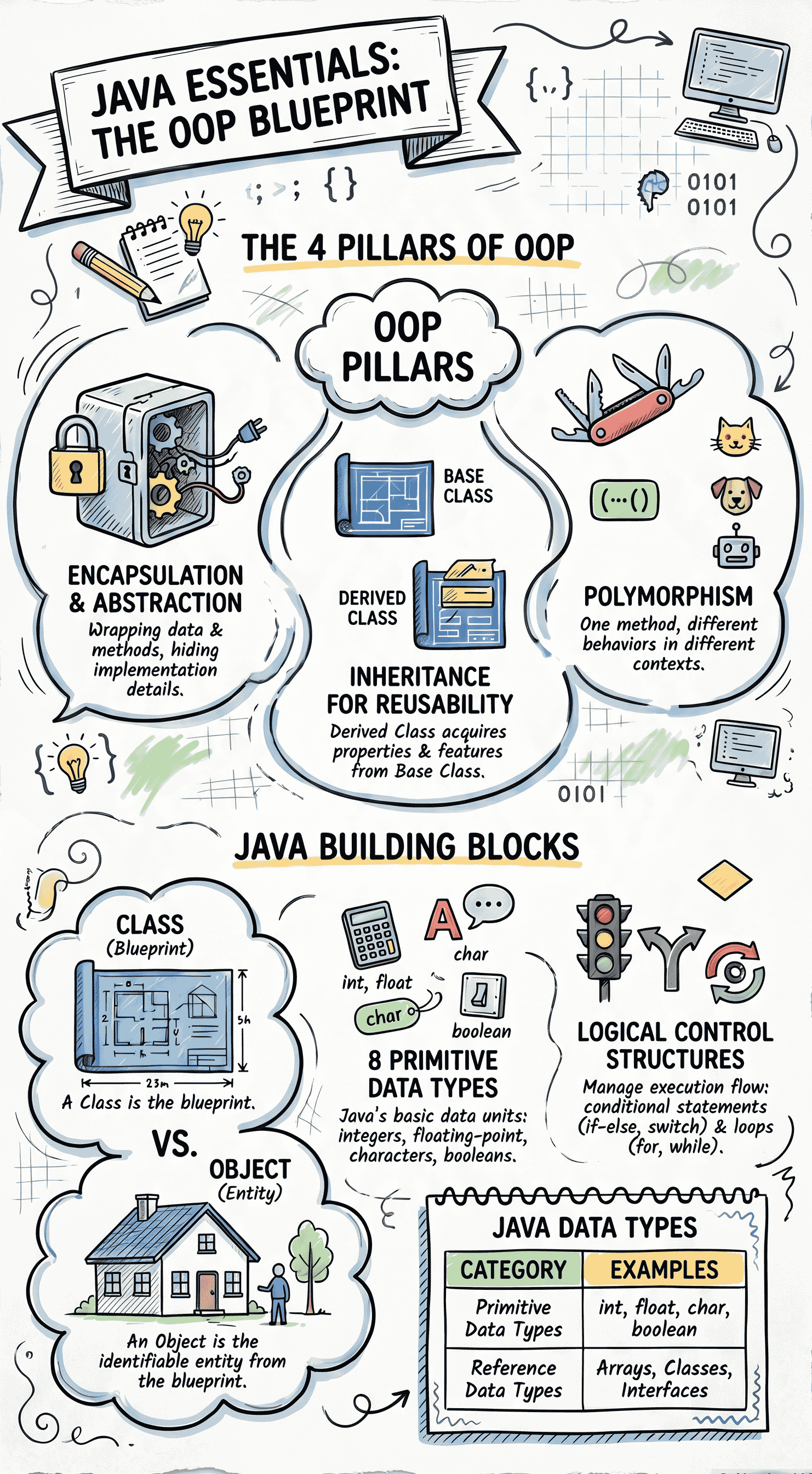
Revision Of Java Concepts
1.1 Introduction to Object-Oriented Programming
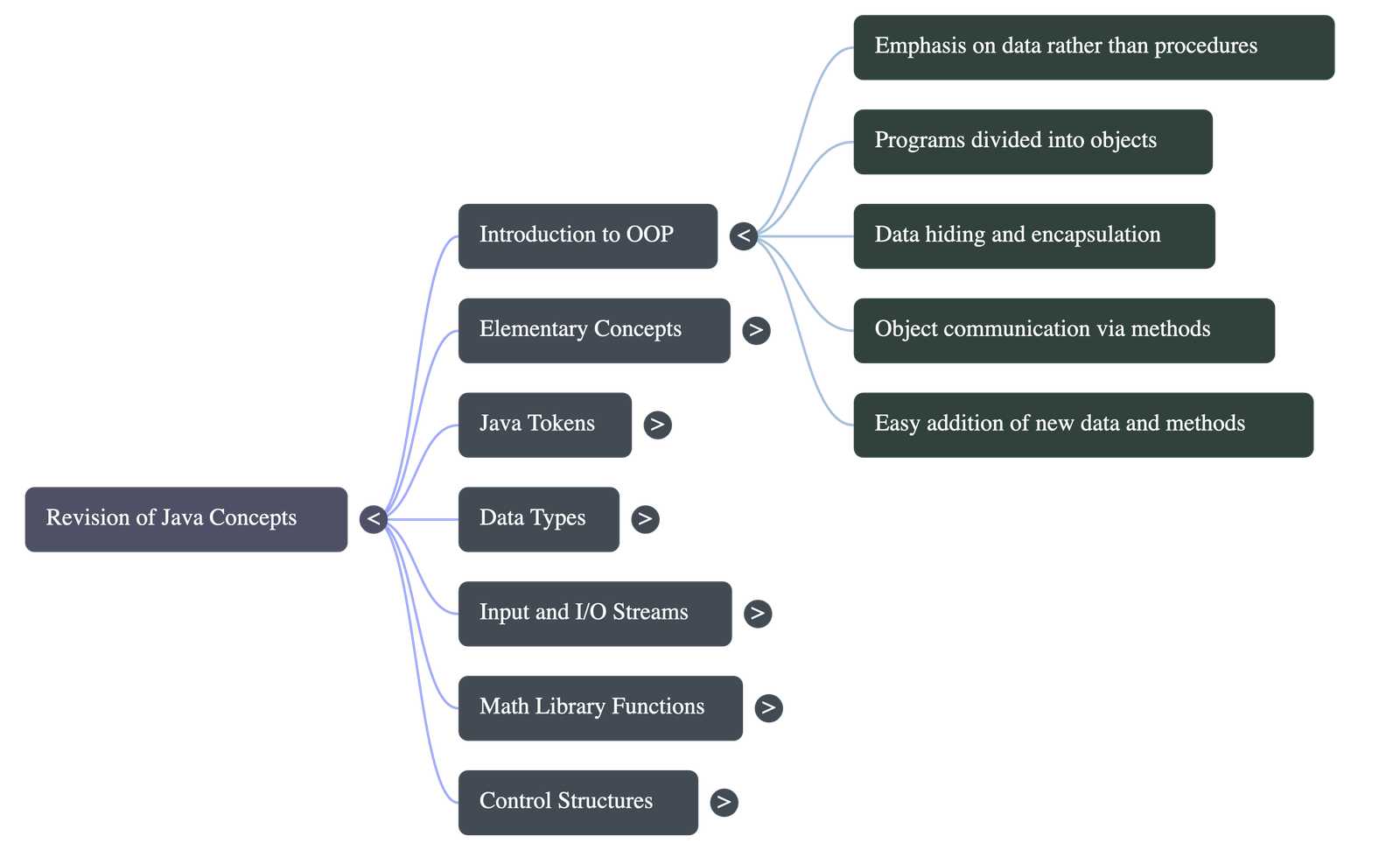
- The Object-Oriented Programming (OOP) approach focuses primarily on data rather than procedures.
- It models programs based on real-world entities. For example, in a library system, entities like books and students become objects.
- Programs are divided into building blocks called objects. Methods (functions) operate on the data tied to these objects.
- Data hiding: Data is secured within objects and cannot be accessed by external methods freely.
1.2 Elementary Concepts of Objects and Classes
1.2.1 Object
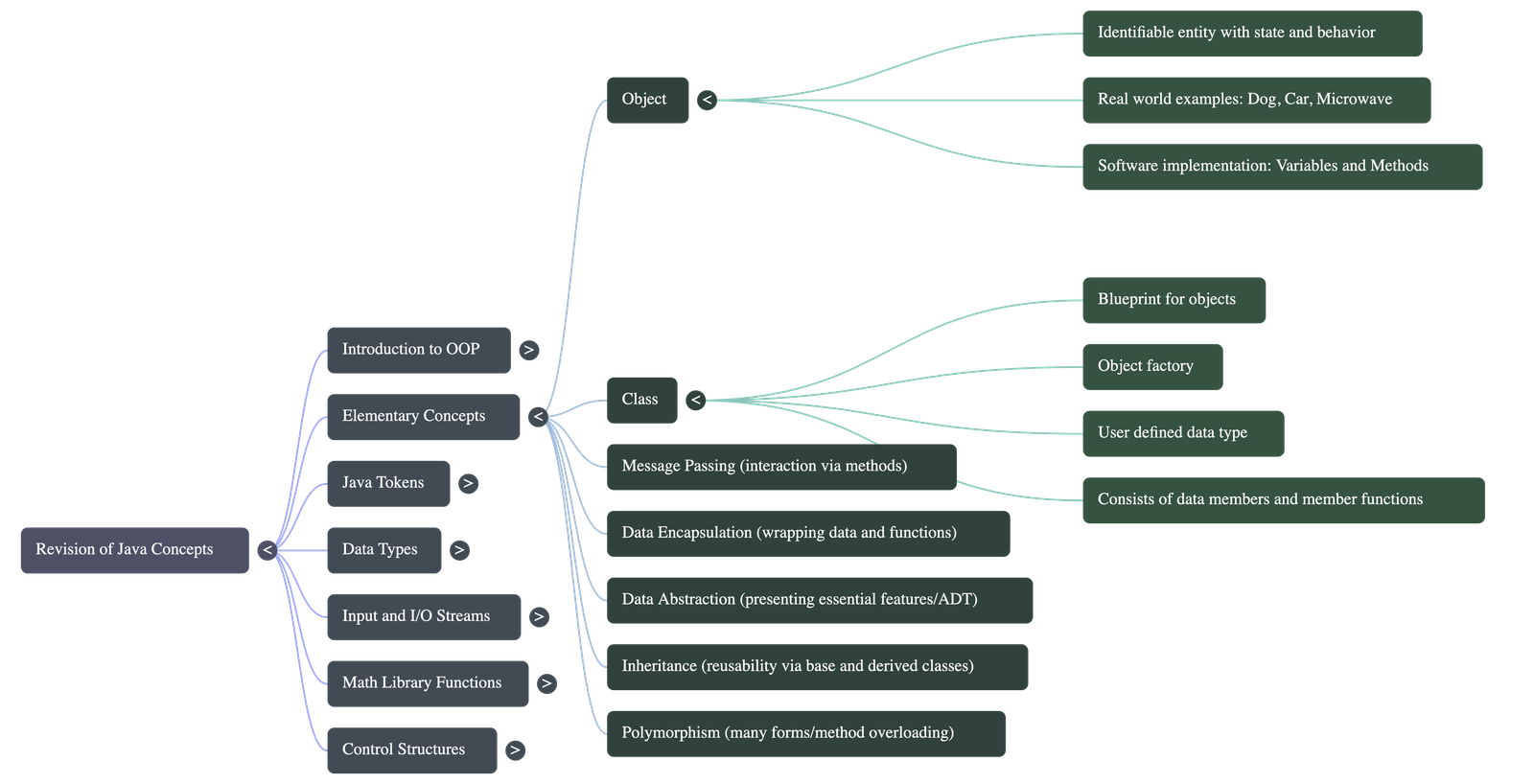
- An object is an identifiable entity with its own characteristics (state/data) and behaviour (methods/operations).
- Software objects are used to model real-world objects; data variables determine the state, and methods enable object-to-object communication.
1.2.2 Class
- A class is a blueprint or template for objects that share common properties and behaviours.
- It acts as an Object Factory, producing individual instances (objects).
- A class is also considered a User-Defined Data Type.
1.2.3 Passing Message Between Objects
- Software objects interact and communicate by sending messages to each other using method calls.
1.2.4 Data Encapsulation
- The wrapping up of data and member functions into a single unit (the class) is called Encapsulation.
- It protects data from direct access, a concept known as data hiding.
1.2.5 Data Abstraction
- It is the act of representing essential features without including background details or complex inner workings.
- Because classes use abstraction, they are often called Abstract Data Types (ADT).
1.2.6 Inheritance
- The process by which one class (Derived Class) acquires the properties of another class (Base Class).
- Inheritance provides the major facility of reusability in programming.
1.2.7 Polymorphism
- Derived from "Poly" (many) and "morph" (forms), it is the ability of a method to take more than one form.
- Method Overloading: Methods with the same name can behave differently when provided with different parameters.
1.3 Values
1.3.1 Basic Elements in JAVA (Tokens)
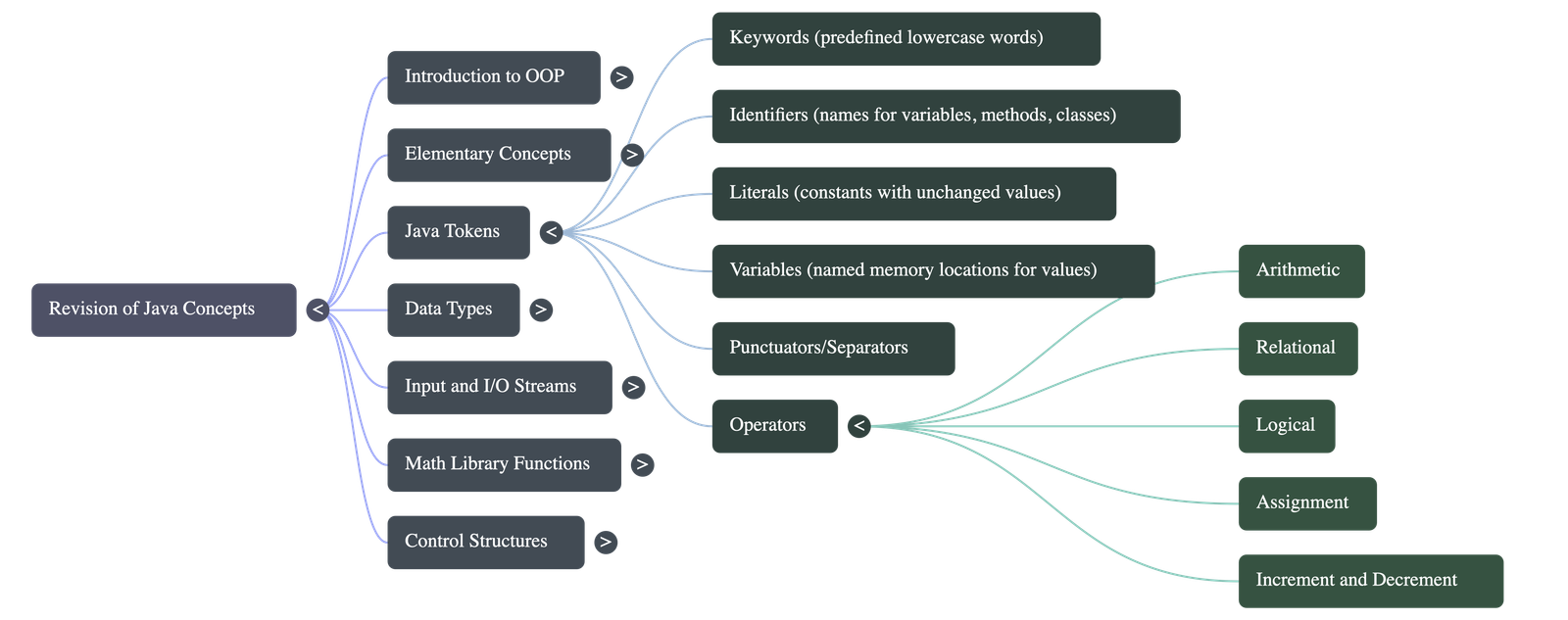
- A token is the smallest individual meaningful element in a Java program (Keywords, Identifiers, Constants, Operators, Punctuators).
1.3.2 Keywords & 1.3.3 Identifiers
- Keywords: Predefined reserved words with special meanings (e.g.,
class,int,public). Written in lowercase. - Identifiers: Names given by the programmer to variables, methods, or classes. Must begin with a letter, underscore (_), or dollar sign ($), and cannot contain spaces. Java is case-sensitive.
1.3.4 Variables & 1.3.5 Constants/Literals
- Variables: A named memory location used to store values that can change during execution.
- Constants: Values that remain unchanged. Created using the
finalkeyword.
Operators in Java
- Operators are classified by the number of operands: Unary (one), Binary (two), and Ternary (three).
- Categories include Arithmetic (+, -, *, /), Relational (>, <, ==), Logical (&&, ||, !), and Assignment (=).
1.5 Concept of Data Types
1.5.1 Primitive Data Types
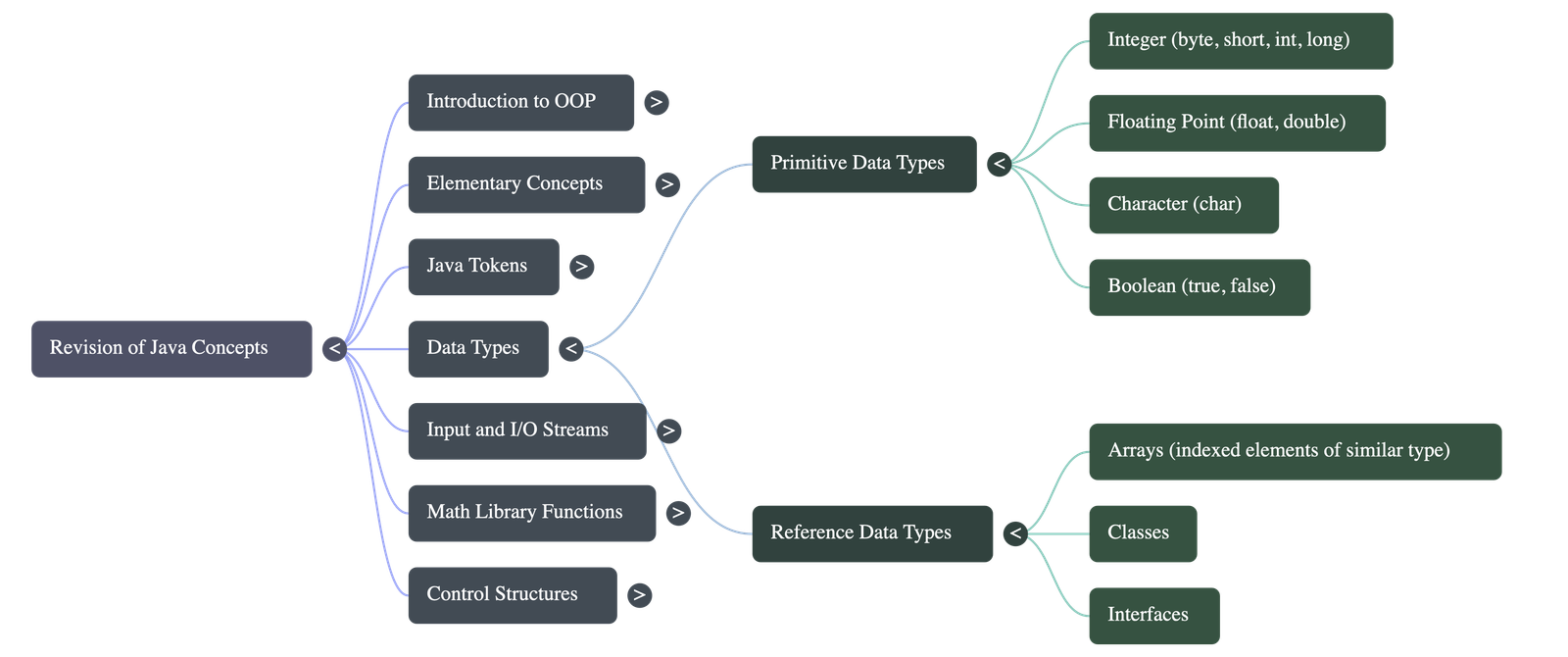
- Basic types built into the language. There are 8 types:
- Integer Types:
byte(1 byte),short(2 bytes),int(4 bytes),long(8 bytes). - Floating-Point Types:
float(4 bytes) anddouble(8 bytes) for decimals. - Character Type:
char(2 bytes), uses Unicode representation allowing flexible global characters. - Boolean Type:
boolean(1 bit), stores only true or false.
1.5.2 Reference Data Types
- Constructed from primitive types. Variables store the memory address of the data rather than the data itself.
- Examples include Arrays (contiguous storage of similar elements), Classes, and Interfaces. Allocated using the
newkeyword.
1.6 Input in Java
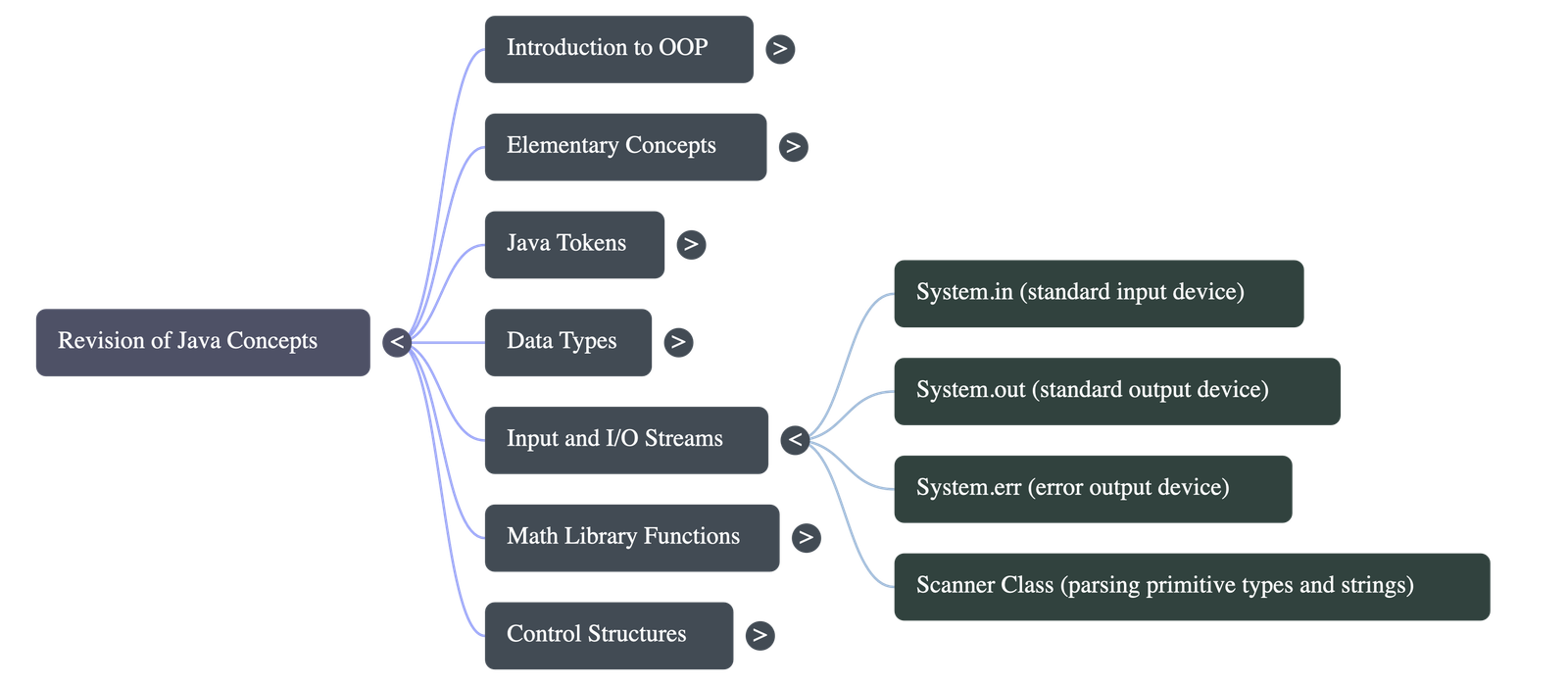
- Input can be taken using standard Input/Output streams via the
java.iopackage (e.g.,BufferedReader,InputStreamReader). - The Scanner Class: Found in the
java.utilpackage, it is easier for parsing primitive types and strings from standard input like a keyboard (usingSystem.in).
1.7 Built in Math Functions
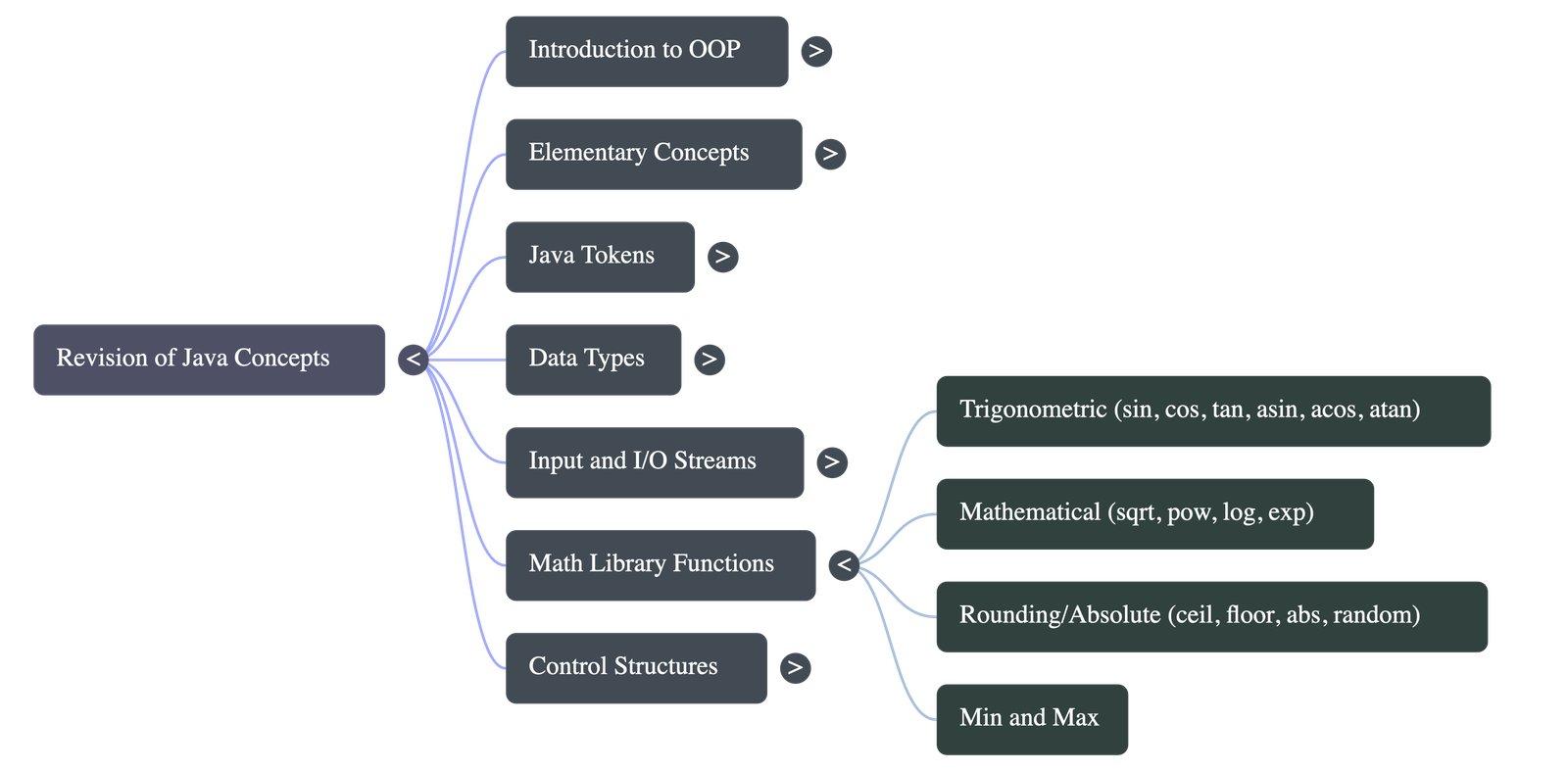
- Accessed via the
Mathclass in thejava.langpackage. - Categories include:
- Trigonometric functions:
Math.sin(),Math.cos() - Min/Max functions:
Math.min(),Math.max() - Power & Logarithmic functions:
Math.pow(),Math.sqrt() - Rounding & Absolute functions:
Math.abs(),Math.ceil(),Math.floor()
- Trigonometric functions:
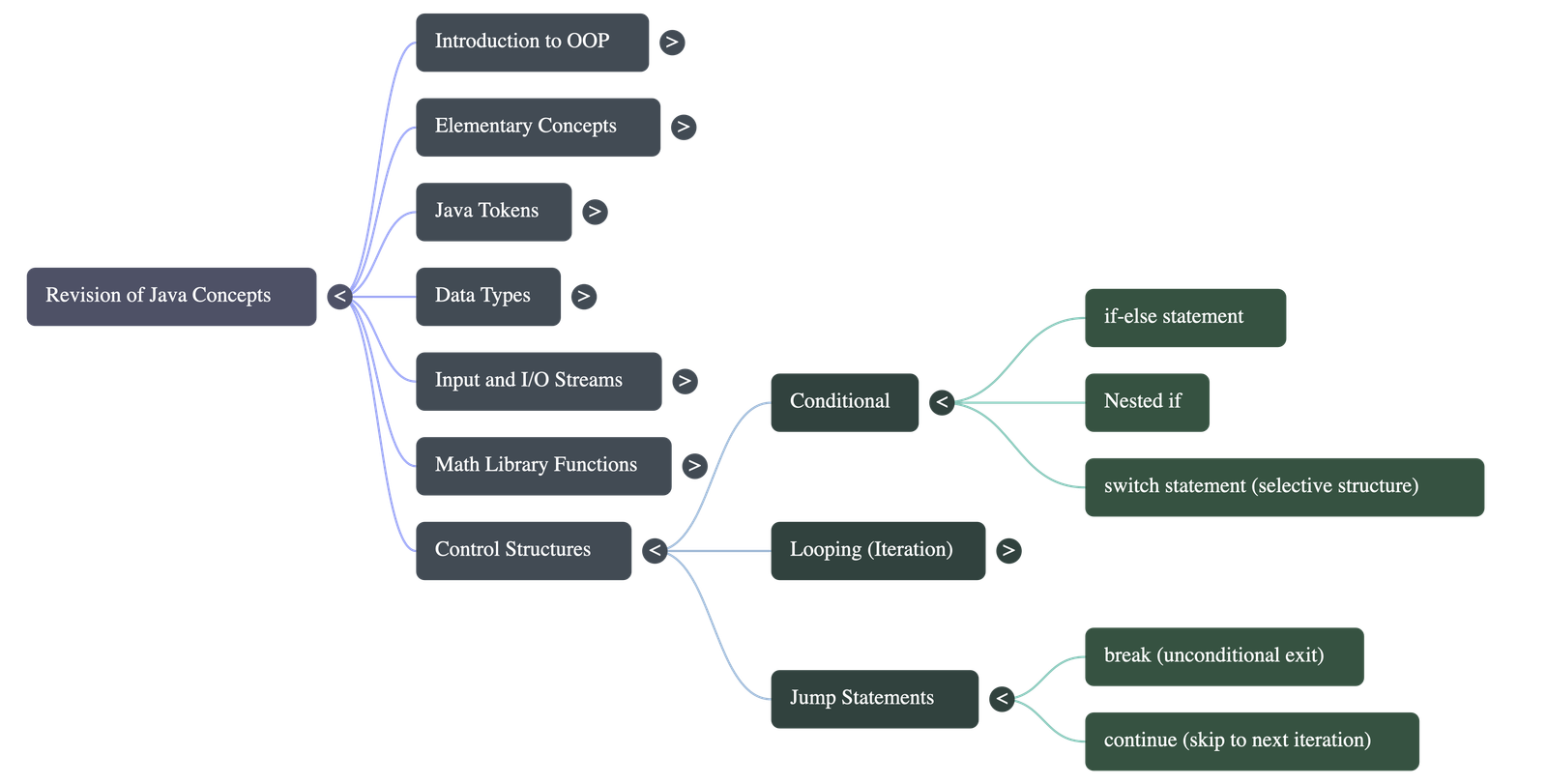
1.8 Conditional Control Structures
1.8.1 if-else statement
- Executes a block of code based on a single true/false condition. If true, the `if` block executes. If false, the `else` block executes.
1.8.2 Nested if statement
- Placing an `if` or `if-else` statement inside another `if` or `else` block is called nesting.
1.8.3 Switch Statement
- A selective structure where an expression's value is matched against a list of constant cases (integers or characters).
- Break statement: Required to stop execution from falling through to the next case.
- Default case: Executes if no matches are found (optional).
- Limitations: Can only check for equality. Cannot use ranges or floating-point tests.
1.9 Looping Control Structures
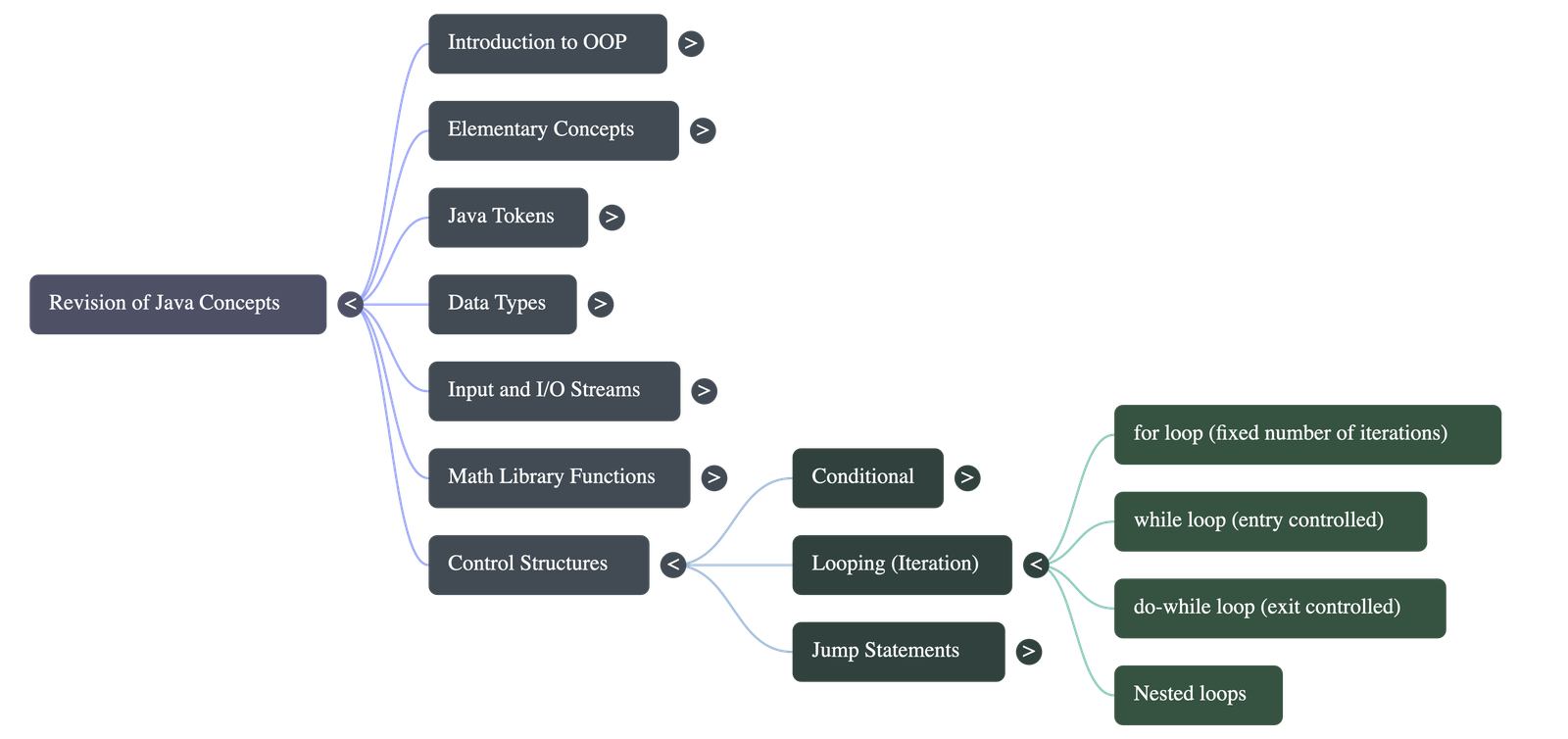
Loops execute a set of statements repeatedly. Key parts include Initialization, Test condition, Update statement, and Loop body.
1.9.1 The For loop
- Best used when the number of iterations is fixed and known beforehand.
1.9.2 The While Loop
- An Entry-controlled loop. The condition is checked at the very beginning. If false initially, the loop does not execute at all.
1.9.3 The Do-While Loop
- An Exit-controlled loop. The condition is checked at the end. The loop will always execute at least once regardless of the condition.
1.9.4 Nested Loops
- Writing one loop inside another loop. The inner loop fully executes for every single iteration of the outer loop.
1.9.5 to 1.9.7 Jump Statements (Break & Continue)
- Break Statement: Takes the control out of a loop or switch unconditionally, terminating it immediately.
- Continue Statement: Aborts the current iteration of a loop and forces the loop to jump immediately to the update statement/next iteration.
Java Concepts: Comprehensive Study Guide
Part 1: Detailed Study Guide
1. Object-Oriented Programming (OOP) Core Concepts
- Object & Class: An object is an identifiable entity with characteristics (state/variables) and behaviour (methods). A class acts as a blueprint or an "Object Factory" from which individual objects are created. A class is a user-defined data type.
- Message Passing: Software objects interact and communicate by sending messages to each other using method calls.
- Data Encapsulation: The wrapping of data and methods into a single unit (the class). This enables data hiding, protecting data from direct access by the outside world.
- Data Abstraction: The act of representing essential features without including background details or complex internal workings. Classes are often called Abstract Data Types (ADT).
- Inheritance: The process where a derived class acquires the properties of a base class, promoting code reusability.
- Polymorphism: The ability of a method to take more than one form, such as method overloading where methods share the same name but take different parameters.
2. Java Basics: Tokens and Data Types
- Tokens: The smallest individual elements of a Java program. Types include Keywords (reserved words like int, class), Identifiers (names given to variables/methods), Constants/Literals (unchanging values), Operators, and Punctuators.
- Primitive Data Types: Java supports 8 primitive types:
byte,short,int,long(integers);float,double(floating point);char(16-bit Unicode characters); andboolean(true/false). - Reference Data Types: Derived from primitive types, they store memory addresses rather than actual values. Examples include arrays, classes, and interfaces.
3. Operators and Input
- Operators: Categorised by operands as unary (one), binary (two), and ternary (three). They include arithmetic, relational, logical, assignment, and increment/decrement operators.
- Scanner Class: Found in the
java.utilpackage, it is used to easily parse primitive types and strings from input streams like the keyboard (System.in).
4. Control Structures & Loops
- Conditional Statements: Include
if-elseconstructs to execute code based on boolean conditions. Theswitchstatement is a selective structure matching a variable against integer, character, or string constants. Thebreakstatement is vital in a switch block to prevent fall-through. - Loops: Used for repetitive execution.
forloop: Best when the number of iterations is fixed.whileloop: An entry-controlled loop that checks the condition before executing the block.do-whileloop: An exit-controlled loop that ensures the block runs at least once before checking the condition.
- Jump Statements:
breakforces an immediate exit from a loop or switch.continueskips the rest of the current loop iteration and proceeds to the update statement/next iteration.
Part 2: Short-Answer Quiz
Answer the following ten questions in 2-3 sentences each.
- What is the conceptual difference between a class and an object?
- How does data encapsulation protect data within a Java program?
- What are the naming rules for an identifier in Java?
- How do primitive data types differ from reference data types?
- Why is the Scanner class useful, and which package must be imported to use it?
- Explain the fundamental difference between a while loop and a do-while loop.
- What does polymorphism mean in the context of Java?
- Why is the break statement crucial inside a switch-case construct?
- What is a token in Java, and what are its main categories?
- What is an entry-controlled loop? Provide an example.
Part 3: Quiz Answer Key
- Answer: A class is a blueprint or template that defines common properties and behaviours. An object is a specific, identifiable instance created from that blueprint, possessing its own unique state and behaviour.
- Answer: Data encapsulation wraps data and member functions into a single unit (the class). This hides the data from the outside world, ensuring it can only be accessed and modified through the class's own methods.
- Answer: Identifiers can contain alphabets, numbers, underscores, and dollar signs, but they must begin with an alphabet, underscore, or dollar sign. They cannot contain spaces, punctuation marks, or match any predefined Java keywords.
- Answer: Primitive data types are basic, independent types built into Java (like int and boolean) that hold actual values. Reference data types (like classes and arrays) are constructed from primitive types and store the memory address of the actual data.
- Answer: The Scanner class simplifies the process of getting input from a user via standard input streams like a keyboard. To use it, a programmer must import the
java.util.Scannerpackage into their program. - Answer: A while loop is entry-controlled, meaning it checks its condition before executing; if false initially, it never runs. A do-while loop is exit-controlled, meaning it executes its body first and checks the condition at the end, guaranteeing at least one execution.
- Answer: Polymorphism is the ability of a method or function to take more than one form. In Java, this is commonly seen as method overloading, where methods share the same name but behave differently based on the parameters passed to them.
- Answer: The break statement is necessary to terminate the switch block once a matching case is executed. Without it, the program will "fall through" and automatically execute all subsequent case blocks until a break is found or the switch ends.
- Answer: A token is the smallest individual meaningful element in a Java program. The main categories of tokens include keywords, identifiers, constants/literals, operators, and punctuators.
- Answer: An entry-controlled loop evaluates its test condition at the very beginning, preventing the loop body from executing if the condition is false. The
forloop andwhileloop are examples of entry-controlled loops.
Part 4: Essay Questions & Detailed Answers
1. Explain the four fundamental principles of Object-Oriented Programming (OOP).
Detailed Answer: Object-Oriented Programming focuses on data rather than structural procedures, relying on four core principles:
Data Encapsulation: This is the process of wrapping data variables and methods into a single unit called a class. It serves to protect data from outside interference, a concept known as data hiding. The data can only be accessed through the interface of the class's methods.
Data Abstraction: This refers to representing essential features of an entity without revealing its complex background details. By providing a simplified interface, classes act as Abstract Data Types (ADT), allowing users to interact with objects without needing to understand the underlying implementation.
Inheritance: This mechanism allows a new class (derived class) to acquire the properties and methods of an existing class (base class). Inheritance promotes massive code reusability, allowing developers to build upon existing code rather than rewriting it.
Polymorphism: Derived from words meaning "many forms," this principle allows a single method name to handle different types and numbers of arguments. A common implementation in Java is method overloading, where the same method name behaves differently depending on the input parameters.
2. Discuss the classification of data types in Java. Provide examples, memory sizes, and default values for the primitive types.
Detailed Answer: In Java, data types define what kind of data a variable can hold and dictate its memory size. They are broadly categorised into Primitive Data Types and Reference Data Types.
Primitive Data Types: These are the basic, independent types built into the language. There are exactly eight primitive types:
- Integer types:
byte(1 byte, default 0),short(2 bytes, default 0),int(4 bytes, default 0), andlong(8 bytes, default 0L). - Floating-point types:
float(4 bytes, default 0.0f) anddouble(8 bytes, default 0.0d). These are used for decimal values. - Character type:
char(2 bytes, default '\u0000'). It uses a 16-bit Unicode system, allowing representation of characters from multiple global languages. - Boolean type:
boolean(1 bit, default false). It can only hold two values: true or false.
new keyword.
3. Compare and contrast the `for`, `while`, and `do-while` loops in Java. Provide clarity on when to use each.
Detailed Answer: Loops in Java are control structures used to repeatedly execute a block of statements. The three primary loops have distinct operational mechanics:
For Loop: The for loop consolidates initialization, condition testing, and updating into a single line. It is an entry-controlled loop, meaning the condition is checked before any execution. It is highly recommended when the exact number of iterations is known beforehand (a fixed loop).
While Loop: The while loop separates the initialization, condition, and update steps. It is also an entry-controlled loop. The condition is checked at the start; if it is false initially, the loop body is completely bypassed. It is best used when the number of iterations is unknown and depends strictly on a dynamic condition being met.
Do-While Loop: Unlike the others, the do-while loop is an exit-controlled loop. The test condition is checked at the very end of the loop body. This structure guarantees that the loop will execute at least once, regardless of whether the condition is true or false initially. It is useful in menu-driven programs where the menu must be displayed to the user at least one time before prompting for a choice.
4. Write a Java program using a switch statement to perform basic arithmetic operations (+, -, *, /) based on user input. Explain how the code works.
Detailed Working & Answer: Below is the code demonstrating a simple switch-based calculator.
import java.util.Scanner;

public class SimpleCalculator {
    public static void main(String[] args) {
        Scanner sc = new Scanner(System.in);
        System.out.println("Enter first number:");
        double num1 = sc.nextDouble();

        System.out.println("Enter an operator (+, -, *, /):");
        char operator = sc.next().charAt(0);

        System.out.println("Enter second number:");
        double num2 = sc.nextDouble();

        switch (operator) {
            case '+':
                System.out.println("Result: " + (num1 + num2));
                break;
            case '-':
                System.out.println("Result: " + (num1 - num2));
                break;
            case '*':
                System.out.println("Result: " + (num1 * num2));
                break;
            case '/':
                if (num2 != 0) {
                    System.out.println("Result: " + (num1 / num2));
                } else {
                    System.out.println("Error: Division by zero.");
                }
                break;
            default:
                System.out.println("Invalid operator.");
        }
    }
}
Explanation: The program utilizes the Scanner class to take two numbers and a character (the operator) as input. The switch construct evaluates the operator variable. Because it's a char, switch handles it perfectly. The program jumps directly to the matching case label. Inside the matching case, it prints the arithmetic result. The break statement is absolutely vital; it forces the control flow to exit the switch block immediately. If it were missing, the program would fall through and execute the subsequent arithmetic operations. Finally, the default case catches any input that is not a valid arithmetic operator.
5. Explain the limitations of the switch statement and describe how jump statements (break and continue) alter control flow.
Detailed Answer:
Limitations of Switch: While the switch statement is an efficient selective structure, it has strict constraints. It only performs equality checks; it cannot evaluate ranges (like > 10 or < 50) or boolean logical expressions. The case labels must be constants or literals (variables are not allowed). Furthermore, prior to recent Java versions, switch statements were restricted primarily to int, char, byte, and short types, entirely prohibiting the use of floating-point numbers (float, double) in case evaluations.
Jump Statements: Jump statements unconditionally transfer program control.
1. The break statement is used to immediately terminate the execution of a loop or a switch case. When the compiler encounters a break, control jumps to the statement directly following the loop or switch block. In nested structures, it only breaks out of the innermost loop.
2. The continue statement is used exclusively within loops. Instead of terminating the entire loop, it aborts only the current iteration. When encountered, control jumps straight to the update statement (in a for loop) or the condition check (in while/do-while loops), skipping any remaining code in the loop body for that cycle.
Part 5: Comprehensive Glossary
- Abstraction
- The act of representing essential features of an object without including background details or inner workings.
- Class
- A user-defined data type that serves as a blueprint or factory from which individual objects with shared properties and behaviours are created.
- Encapsulation
- The principle of wrapping up data and member functions into a single unit (the class), ensuring data hiding and security from external access.
- Identifier
- A sequence of characters used by programmers to name variables, methods, classes, packages, and interfaces in Java.
- Inheritance
- The process by which an object of one class (derived class) acquires the properties and methods of another class (base class), facilitating code reusability.
- Keyword
- A predefined, reserved word in Java that holds special meaning to the compiler and cannot be used as an identifier (e.g.,
class,int,public). - Object
- An identifiable entity, modelled from real life, possessing specific characteristics (state) and behaviour (methods). An instance of a class.
- Polymorphism
- The ability of a single function or method to take on multiple forms and exhibit different behaviours depending on the data passed to it (e.g., method overloading).
- Primitive Data Type
- The basic data types built into Java that hold actual values rather than memory addresses. The 8 types are byte, short, int, long, float, double, boolean, and char.
- Scanner
- A class in the
java.utilpackage used to parse primitive types and strings, commonly used to collect input from standard input devices like a keyboard. - Switch Statement
- A conditional control structure that allows a variable to be tested for equality against a list of literal values or constant cases.
- Token
- The smallest individual element of a Java program that is meaningful to the compiler.
Do checkout all questions & answers of this chapter.